We are pleased to welcome guest blogger Lars Meyer of Consigas. Based in Dublin, Ireland, Consigas is a Palo Alto Networks Elite Authorized Training Center that specializes in consultancy and virtual training.
The whitepaper from the SANS Institute “Beating the IPS” shows that any Intrusion Prevention System from any vendor can be evaded. The same is true for any other threat prevention techniques from classic AntiVirus to newer technologies like Sandboxing as none of them provide total security on their own.
The good news is that hackers face exactly the same challengeas there isn’t a single attack technique that allows them to accomplish their final objective, of exfiltrating data or taking control of IT resources for criminal activity. Nowadays an attack is a sophisticated, stealthy and continuous process, compromised of a chain of multiple steps that an attacker has to successfully go through in order to accomplish his goal.
To achieve 100 percent security is not possible, but that’s not an issue as long as you keep your IT infrastructure defendable. A good analogy is the human immune system. A healthy lifestyle will keep us fit, but it doesn’t provide total protection from viral infections. However being sick isn’t the end of the world as long as the body is able, or with medical intervention,enabled to effectively defend itself and mitigate the impact of the infection. There is however a big difference between humans and an IT system. We know when we feel sick and we instinctively know when to go to the doctor. Getting this level of insight into an IT infrastructure is difficult, and at the same time there isn’t such a thing as a magic box which instinctively protects your network all on its own.
The solution is what I like to call the magic sauce, which is to put the right combination of threat prevention techniques together to make it close to impossible for an attacker to evade all of them. Palo Alto Networks Next-Generation Firewall isn’t a magic box either, but you can do magic with it if you use it in the right way, along with the other key components of the Palo Alto Networks security platform, including the Threat Intelligence Cloud and Advanced Endpoint Protection, and leverage its full potential.
In an earlier blog post I mentioned that the challenge for securing mobile devices has been formidable for many organizations. The limitations that arise out of classical approaches and assumptions towards security have led to many dead ends in the era of BYOD.
By working with AirWatch by VMware, we have developed a number of technical integration points that address the challenge for securing BYOD by providing ways to secure business apps and data and stop threats while still respecting the boundaries of privacy of personal data and traffic. This type of work is only possible by bringing together our engineering teams to design features in our respective products and develop the necessary APIs to exchange the information and make the best policy decisions.
Palo Alto Networks and AirWatch by VMware have a close partnership that makes this type of interaction possible. This week, we are at AirWatch Connect 2015 in Atlanta, and proud to highlight yet another development in our relationship.
AirWatch announced the AirWatch Mobile Security Alliance, an initiative that highlights the growing concerns over mobile threats and provides AirWatch customers with trusted, tested and integrated options to provide protection. Palo Alto Networks is as a member of the AirWatch Mobile Security Alliance, and customers who depend on AirWatch to manage their mobile devices can use integration with Palo Alto Networks to inspect business traffic, stop known and unknown mobile threats, and identify mobile devices that are already infected with malware.
At AirWatch Connect, the Mobile Security Alliance is front and center as one of the major focuses around security. If you’re here at the conference, be sure to see the announcement at the keynote session and stop by and see us at the Mobility Expo. If not, you can learn more about the partnership from www.paloaltonetworks.com/airwatch. I look forward to seeing you here in Atlanta!
A few days ago, we investigated a new malware called XcodeGhost that modifies Xcode, infects iOS apps and is seen in the App Store. We also found more than 39 iOS apps were infected, including versions of some pretty popular apps like WeChat or Didi, potentially affecting hundreds of millions iOS users. We also analyzed XcodeGhost’s remote control functionalitiesthat can be used by attackers to phish or to perform further attacks. In this post we will discuss a few more details since learned about XcodeGhost and its behavior.
Actions to Stop the Attack
Since our post on September 18, Palo Alto Networks has cooperated with Apple, Amazon and Baidu to share samples, threat intelligence and research. All of them have taken actions to stop the attack or to mitigate the security threat.
Starting September 18, Apple began to remove some iOS apps infected by XcodeGhost from its App Store. Apple also sent an email to affected developers, guiding them to recompile their products by official Xcode, and to re-submit again. Apple has acknowledged XcodeGhost as malware and that it has affected the App Store.
Figure 1. The “Railway 12306″ were temporarily removed in App Store
Amazon has also taken action, including to shutdown all C2 servers on Amazon Web Services that XcodeGhost was seen to have used to upload privacy information and dispatch controlling commands.
Baidu has removed all malicious Xcode installers from its cloud file sharing service, making it much harder for a developer to download an infected Xcode unintentionally.
As of this writing, on Monday, September 21, we notice that there are still some previously known infected iOS apps available in App Store, among them China Unicom Mobile Officeversion 3.2.(Figure 2).
Figure 2. An infected app is still available in App Store in Monday morning
More Infected Apps Disclosed
In the last few days, other security companies claimed many more iOS apps being infected by XcodeGhost. For example, Qihoo 360 listed 344 infected apps in their blog. Pangu Teamclaimed detection of 3,418 different iOS apps being infected. Pangu Team also released an iOS app to detect the trojanized iOS apps they’ve found.
We have not verified their results. However, considering that the malicious Xcode installers were spread since March 2015, the C2 servers also launched in March, and search engines’ results were polluted, it wouldn’t be surprising if the affected number of iOS apps is far greater than we thought.
In this presentation, researchers from Sandia Notional Laboratories presented the idea of attacking the Xcode to infect apps on both iOS and OS X. Note that The Intercept reported this presentation in March 10, 2015 – the same month XcodeGhost was launched.
Figure 3. Document leaked by Edward Snowden showed the same attacking method
In our September 17 report, we introduced that XcodeGhost added malicious “CoreServices” object files to those Xcode installers. When developers using infected Xcode to compile an app, the linker will link these malicious object files to the app’s executable file. How is this accomplished?
By analysis, XcodeGhost also modified this file in Xcode to control the linker:
In Xcode, this Ld.xcspec file contains configurations used by the ld linker. In the end of this file, the definition of the “DefaultValue” variable was changed by XcodeGhost by appending a string of:
Using this method, the malicious object file will be forcibly linked to target executable file. This modification won’t be showed in Xcode’s user interface but will be listed in the compiling logs.
Prompting Alert Dialog
In previous reports, we discussed that XcodeGhost’s malicious code can be used for phishing by prompt deceptive alert dialog with built-in remote control functionalities. Here we actually made a mistake in our initial reporting. In the current version of the code, XcodeGhost cannotbe directly used to phish iCloud passwords. However, by changing a few simple lines of code, itcan do that. .
In iOS, if an app prompts a dialog by the UIAlertView class, there’s a property alertViewStyle to specify which kind of dialog it wants to show. For example, if a password input dialog is needed, the property should be assigned to UIAlertViewStyleLoginAndPasswordInput. If the iOS developer didn’t specify any value, by default the dialog will have no input form but is just an alert with message and buttons.
We checked all versions of malicious files in XcodeGhost we have available, and didn’t find any one of them specified this property when prompting the alert dialog. Hence, current XcodeGhost cannot be directly used for iCloud password phishing.
However, it’s pretty easy for the author to add an alertViewStyle value and a delegate to handle user’s input. In this way, XcodeGhost can be used to phish any kind of password.
Potential Vulnerability in XcodeGhost
XcodeGhost used HTTP to upload information and receive C2 commands. The content in these HTTP requests and responses were encrypted by DES algorithm in ECB mode. It’s also not hard to find the encryption key in its code by reverse engineering.
Consider that HTTP traffic can be hijacked or faked in many ways. There’s a vulnerability in the infected iOS apps whereby the malicious code in them can be controlled by any man in the middle. By exploiting this vulnerability, an attacker can construct any URL in any scheme and control infected apps to open, or prompt an alert dialog for further attacks.
Note that although the malware’s C2 servers were shutdown, this vulnerability still exists and can be exploited in all affected iOS devices.
Security Suggestions to iOS Users
iOS users can install Pangu Team’s app (by directly visiting x.pangu.io in iPhone or iPad) to detect whether their installed apps were infected. If there is any infected app, we suggest users temporarily delete it until there is an updated version available from its developer.
Two more actions will also be helpful to mitigate potential attacks or exploitation in further. One is to enable two-step verification for your Apple ID, and the other is to avoid using untrusted WiFi network.
Even with all of these steps, it’s still a challenge for iOS users to protect themselves from this kind of malware. The attention this has received will hopefully incent Apple and developers to prevent similar attacks in the future.
Suggestions to iOS and OS X Developers
In order to avoid being affected by similar malware in the future, we recommend that all developers should always directly download official development tools from official channels. This includes downloading Xcode, SDKs and the Command Line Tools from Apple’s websites or from Mac App Store, and downloading third-party libraries such as Unity3D from their original providers.
Second, we suggest all developers set the Gatekeeper protection level to default value in their Mac computers for development, for integration and for deployment. To do this, go to System Preferences, Security & Privacy, and set only allowing apps downloaded from “Mac App Store and identified developers.”
Last, we urge iOS and OS X developers check the integrity of their development tools and libraries before a new version of product will be released – every time. This can be done by the “codesign” utility or by hash values checking.
Acknowledgements
Thanks @noar for notifying us the modification in the Ld.xcspec file.
Over the ages, philosophers challenged the conventions of traditional thinking by meditating upon a “koan.” A koan is similar to a riddle, except that there is no punchline. It typically involves a paradoxical statement that is subject to a multitude of interpretations, many of which are correct in their own peculiar way. And even when analyzed with a great deal of time and deep thought, the koan defies an answer.
For security practitioners, the topic of what to do about mobile devices introduces a series of modern-day koans.
How could your network security policies apply to users who are not in the office?
How do you inspect traffic when users are not behind your firewall?
How can you provide security while respecting privacy?
How can you protect business data on a device that you don’t own?
These questions were not easily solved, primarily because conventional thinking led to more dead ends. Organizations accustomed to having total control over fairly stationary, corporate-owned devices found themselves in an entirely different world when faced with mobile devices and BYOD. And trying to apply such measures often led to stalemates or unacceptable compromises to the protection of the company’s data or user’s expectation of privacy.
In order to address concerns with mobile security, and break through the questions around past approaches, Palo Alto Networks partnered with VMware/AirWatch to bring forward fresh thinking. The Palo Alto Networks next-generation security platform provides the most comprehensive approach to stopping threats, based on prevention. AirWatch has deep expertise for managing mobile devices and applications. By providing integration points between these two sets of products, we can provide our respective customers a solution to deliver security for business assets on a device while honoring privacy for both personal data and traffic.
The first aspect of the integration is the use of AirWatch’s enrollment process to provision the GlobalProtect app. During enrollment, an unmanaged mobile device (including one that is personally owned) is loaded with the appropriate configuration and enterprise applications that prepare it for use in a business environment. The organization can manage the business assets separately from the personal apps and content on the device. The GlobalProtect app can be transparently installed during enrollment, providing the key capability of establishing an app-level VPN tunnel back to the next-generation firewall for traffic visibility, the enforcement of policy, and threat prevention. The traffic from personal apps remains untouched, thus honoring the user’s expectation for privacy with non-business-related activity.
A second aspect of the integration is the use of threat intelligence from WildFire to detect mobile devices with malware. Since AirWatch knows about the inventory of apps on a mobile device, integration with WildFire allows the organization to spot devices that are infected. AirWatch can apply a workflow to address the issue, such as alerting the user or quarantining the device until the problem has been corrected.
With these new capabilities, organizations have a more nuanced and balanced approach to mobile security, one that’s focused on the specific requirements of protecting the business apps and data without having to cross personal boundaries. By applying an integrated approach, the mobile security koans now have answers that are readily available. The organization can move forward with the adoption of mobile computing by having the requisite security for business content while honoring their employees’ expectations of privacy for personal data.
To learn more about this integration, visit http://paloaltonetworks.com/airwatch for more information. Palo Alto Networks will also be on hand at AirWatch Connect in Atlanta this week. Watch this space for more thoughts following my time there.
On Thursday we posted the initial analysis report on XcodeGhost malware and then found ithad infected 39 iOS apps, potentially impacting hundreds of millions of users. XcodeGhost embedded malicious code into those infected iOS apps. In the first report, we noted that the malicious code uploads device information and app information to its command and control (C2) server. But that isn’t all it does.
Today, inspired by a post by “@Saic” on Sina Weibo, we analyzed the malicious code in more detail and found additional capabilities in the malware. In summary, the malicious code that XcodeGhost embedded into infected iOS apps is capable of receiving commands from the attacker through the C2 server to perform the following actions:
Prompt a fake alert dialog to phish user credentials;
Hijack opening specific URLs based on their scheme, which could allow for exploitation of vulnerabilities in the iOS system or other iOS apps;
Read and write data in the user’s clipboard, which could be used to read the user’s password if that password is copied from a password management tool.
Additionally, according to one developer’s report, XcodeGhost has already launched phishing attacks to prompt a dialog asking victims to input their iCloud passwords.
Based on this new information, we believe XcodeGhost is a very harmful and dangerous malware that has bypassed Apple’s code review and made unprecedented attacks on the iOS ecosystem. The techniques used in this attack could be adopted by criminal and espionage focused groups to gain access to iOS devices.
Technical Details
XcodeGhost added code to some system APIs that are used by the infected apps. After the malware sends device and app information to it’s C2 servers, XcodeGhost will decrypt the content returned by the server and parse it as a piece of JSON formatted data.
Figure 1. XcodeGhost decrypts response JSON data
In the JSON data, XcodeGhost will look for these keys:
alertHeader
alertBody
appID
cancelTitle
confirmTitle
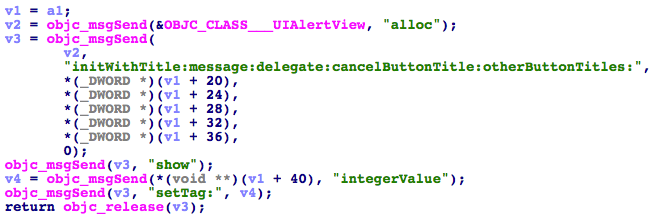
The malware uses the specified title and body texts to create a fake alert dialogue box.. Using this technique, XcodeGhost can be used to “phish” information from the user, or trick them into inputting sensitive data. For example, it can create a dialog that asks the victim to input their password. Since the dialog is a prompt from the running application, the victim may trust it and input a password without suspecting foul play.
Figure 2. XcodeGhost prompts a alert dialog with specific title and message text
If the returned JSON data from the server contains the key “url”, XcodeGhost will open the URL specified.
Figure 3. XcodeGhost opens remotely specified URL
Note that the specified URL doesn’t have to be only HTTP or FTP URLs but also the URLs used by iOS system with any scheme that local system can handle. (i.e. itunes:// or twitter://) The URL scheme is one of the main Inter-App Communication mechanisms in iOS system. Any iOS apps, include system apps, can define any scheme it can handle. Multiple previous vulnerabilities in iOS and various iOS apps have been caused by scheme handling flaws that can be exploited by opening specific URLs. These vulnerabilities must be exploited locally by a malicious app, which led many people to not treat them as serious as iOS malware is uncommon. XcodeGhost has broken this assumption by infecting many popular iOS apps that are widely used.
Finally, XcodeGhost will also use the clipboard functionality provided by iOS to temporarily store some data it needs. In fact, every time an infected app is launched, XcodeGhost will retrieve persistently stored data from the clipboard with a paste board named by app’s bundle ID and a fixed string “UIPasteBoard”, then store new data inside it. Although this behavior is not harmful to users, a slightly code change would allow the same technique to steal passwords from password management apps such as 1Password.
When people use apps like 1Password to manage their passwords in iOS, they often open 1Password, copy the stored password to system clipboard, then open the app they want to use and paste the password to the login window. At this moment, a malicious app can directly read the password from system clipboard. 1Password’s main security design for this situation is that, the password stored in the clipboard will only stay there for a very short time. However, since the malware can read it when the app launches, the attack can be successful.
Attack in the Wild
Earlier today on a popular Chinese forum V2EX, a user “realpg” mentioned his experience when developing iOS apps using the malicious Xcode package. His write-up disclosed that XcodeGhost’s attacker has used the malware to phish victims’ iCloud passwords.
In the discussion, “realpg” said that when they were developing a very simple iOS app that had no Internet functionality and didn’t use any iCloud APIs, the app would frequently display a dialog to ask the developer to input his iCloud password. They tested the app in their special testing iPhone without jailbreak. Then they tried to capture the network traffic and found the exactly the same C2 domain name used by XcodeGhost infected apps.
Based on “realpg”’s account of the events, we believe that stealing passwords or potentially exploiting vulnerabilities in iOS and in legitimate applications may be the true purpose of XcodeGhost.
Acknowledgement
Thanks to Luyi Xing from Indiana University for providing knowledge about password management tools. Also, many thanks to @Saic on Sina Weibo for identifying potential behaviors in XcodeGhost.