Fresh Baked HOMEKit-made Cookles – With a DarkHotel Overlap

Threat actors tend to reuse certain tools, a trend we observed during recent Unit 42 research published on MNKit. In this post, we will discuss a fresh toolkit, which on the surface, appeared similar to MNKit, but functionally was found to be quite different.

This toolkit, which we named “HOMEKit”, is similar to MNKit in that it is also designed to generate weaponized Microsoft Word documents containing an exploit for CVE-2012-0158, but it uses OLE instead of MHTML files. In addition, we have been able to track the use of HOMEKit by its operators since 2013 across a variety of campaigns, using several different variants of the toolkit. For this post, we will be focusing on the most recent example of the HOMEKit toolkit, in addition to an interesting overlap we discovered with the well-known attack campaign DarkHotel. In a follow-up post, we will discuss the other campaigns associated with HOMEKit, along with other variants of HOMEKit that we discovered.

In addition to analysis of HOMEKit, we will also examine a new payload we discovered embedded in one of the malicious documents created by HOMEKit, which we have named “Cookle.” It is a fairly simple downloader tool, but until now has not been publicly discussed. Cookle deploys some interesting tactics to obfuscate its activity.

Telemetry

In late June 2016, we collected an e-mail file (Figure 1) that appeared to carry a phishing attack with a malicious file attached. The sender address was spoofed, using the identity of a coordination associate for the United Nations Environment Programme (UNEP). The content of the email seemed legitimate, using the subject line of “Pyongyang International Phonebook and Mailing lists – JUNE,” attempting to appear as a global directory for residents of the Democratic People’s Republic of Korea under UNEP. To further increase the legitimacy of the phishing attack, the threat actor copied the coordination associate’s signature block as well.

Figure 1 Phishing email carrying HOMEKit exploit file

The email contained two file attachments, a Microsoft Word document and a Microsoft Excel document. The Excel document proved to be benign, but the Word document exploited the CVE-2012-0158 vulnerability. If the victim were to open the Word document, it would silently install the Cookle Trojan, while opening a decoy document in Word (Figure 2), displaying the expected content to the victim.

Figure 2 Decoy document containing message intended for residents of Pyongyang

The benign Excel document and the Word document used as decoys both appeared to be legitimate, internal documents; the Word document containing the email addresses of all DPRK UNEP residents, along with mailing lists to use for specific topics. The Excel document contained additional contacts for other related agencies, in addition to emergency contact information for the DPRK UNEP residents. Examination of the metadata of the two files revealed the Excel document was last modified by the spoofed sender’s identity on June 22, 2016, while the decoy Word document showed the original author as the Coordination Officer in 2012, with a creation timestamp of July 19, 2012. The “last modified” field of the decoy document though revealed its true nature, showing that it was last modified on April 5, 2016, by “Windows User” indicating the decoy document was likely to be last modified by the threat actor.

By using the specific documents observed in this attack, the threat actor demonstrated that he or she may have already gained unauthorized access to some extent. Also, the contents of these internal documents show that the threat actor currently has access to data that could be further leveraged to craft additional phishing attacks at related targets.

HOMEKit

The HOMEKit toolkit creates Microsoft Word documents (OLE) that exploit the CVE-2012-0158 vulnerability. All malicious documents created by the HOMEKit toolkit have the same metadata within the SummaryInformation and DocumentSummaryInformation streams of the OLE document, as seen in Figure 3.

Figure 3 HOMEKit Meta Data

HOMEKit creates documents designed to exploit a vulnerability within the TreeView ActiveX control, specifically the CLSID of 9368265E-85FE-11d1-8BE3-0000F8754DA1. Upon successful exploitation, the malicious document will execute shellcode to open a decoy document (~.doc) while it installs and executes a payload on the system (~.dat).

The shellcode executed by this variant of HOMEKit begins with a decryption stub that is responsible for decrypting the functional shellcode. The decryption stub uses a combination of right bit shifting (ROR 3) and an XOR operation (key of 0xAF) on each byte of ciphertext.

The functional shellcode exposed by the decryption stub starts by enumerating open file handles looking for files that have a file size greater than zero. It then reads the last 20 bytes of each file looking for the value “0xDEADFOOD” at the very end of the file to find the delivery document. Once it finds the appropriate file, it parses the last 20 bytes of the file to locate the payload and decoy document using the following structure:

To decrypt the payload and decoy, the shellcode uses an algorithm that starts from the end of the ciphertext, using the lowest byte of the initial value of “0xDEADFOOD” to XOR the first byte and then rotating the key value by 1 for each subsequent operation. The shellcode will save the payload to %TEMP%\~.dat and the decoy to %TEMP%\~.doc after the decryption routines are finished. Once the payload and decoy are saved to the system, the shellcode creates a process with %TEMP%\~.dat to execute the payload and creates a process with the following command line to open the decoy document:

cmd.exe /c dir /s %windir%\system32\*.sys&&taskkill /im winword.exe /f&dir /a /s %windir%\system32\*.msc && DOCUME~1\ADMINI~1\LOCALS~1\Temp\~.doc

When creating the processes to run the payload and open the decoy, the shellcode calls GetCurrentProcess to get a handle to the current Word process, then OpenProcessToken to access the Word process’s token. Finally, it uses this token to call CreateProcessAsUserA to run the payload and the decoy with the same context as the current Word process.

Cookle Trojan

At a high level, the payload delivered in this attack is a downloader Trojan that we are tracking as “Cookle” based on a header value in HTTP requests made by the malware.

After initial execution, the Trojan creates the mutex “LDE_160425” and copies itself from %TEMP%\~.dat to %APPDATA%\Microsoft\WindowsUpdate\~.exe. For persistence, the Trojan creates the following registry key with a path to the newly copied Trojan:

SOFTWARE\Microsoft\Windows\CurrentVersion\Run\Startup

A majority of the pertinent strings embedded within the Trojan are encoded, which the Trojan decodes using a modified base64 decoding function that swaps the uppercase letters in the base64 alphabet with lowercase letters, and vice versa. It uses this custom base64 decoder to decode the following strings:

The Trojan contains two command and control (C2) domains within the encoded strings listed above, dyn.kaleebso[.]com and dyn.pwnz[.]org. The Trojan sets a sleep timer of 20 minutes to wait before generating and sending network beacons to the C2 servers. The initial beacon seen in Figure 4 contains a misspelled “Cookie” field that includes the same value the Trojan uses as a mutex.

Figure 4 C2 Beacon sent from Cookle Trojan

If the Trojan receives a response to this beacon from the C2 server, it runs several system commands, specifically systeminfo, tasklist, netstat /ano, and ipconfig /all. It will then take the output from those system commands and save the output to a text file in the %TEMP% folder with a filename of “<year><month><day><hour><minute><second>.tmp”. The Trojan will then send the contents of this file to the C2 server as cleartext within a HTTP POST request that will resemble the following:

Figure 5 HTTP POST request issued by Cookle that sends system information to C2 server

The C2 server will respond to this request with a command that the Trojan will parse. The Trojan’s command handler has three available commands:

Figure 6 Commands within Cookle’s Command Handler

The functionality available within the Trojan is limited, however, it allows the actor to perform system reconnaissance before delivering a secondary payload. The secondary payload is delivered via the ‘d’ command, wherein the Trojan will decrypt an executable using the XOR operation on each byte in the C2’s response with 0xA7. During the analysis period, the C2 servers did not respond with a secondary payload.

Overlap with DarkHotel

Collection of additional HOMEKit delivery documents revealed use of this toolkit by its operators since at least 2013 and most recently, late June 2016. Each of these malicious documents created by the HOMEKit toolkit installed different payloads including PlugX, Sutr, and HIMAN/Mirage, among others. As mentioned earlier, we will be publishing a follow up to this post that contains details of these prior attacks.

As part of the collected sample set, we found two documents that have a very similar structure as the delivery document used in the attack delivering the Cookle payload but with very slight variations in the exploit code. The most curious aspect of these two documents was the payload embedded in them.

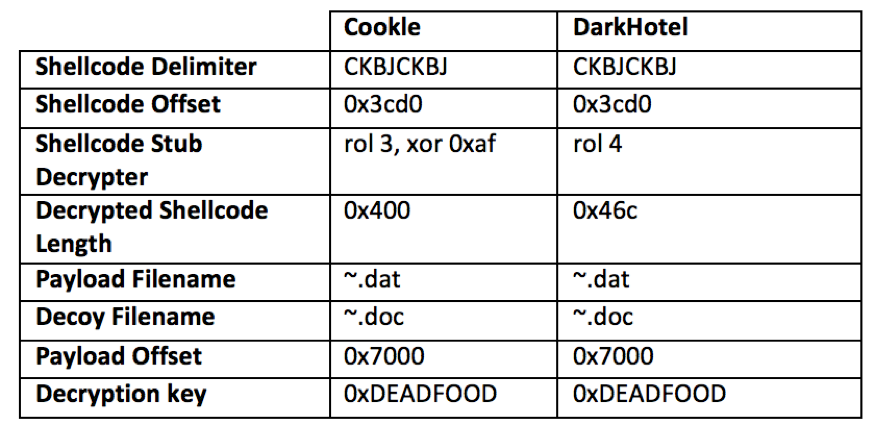
Both of the additional HOMEKit samples have the same functional shellcode and install a downloader associated with the Tapaoux Trojan, a tool related to the DarkHotel threat group. We compared the shellcode embedded in the HOMEKit delivery documents with previous samples associated with DarkHotel and found striking similarities (Figure 7).

Figure 7 Comparison of notable static attributes within HOMEKit documents installing Cookle and DarkHotel

The major difference between the HOMEKit documents dropping Cookle and DarkHotel begins with the stub decrypter, as seen in Figure 7. The stub decrypter decrypts a second piece of shellcode that carries out the main functionality as mentioned previously in this post. The decryption routines themselves differ, as seen in the green highlighted instructions in Figure 8. The size of the decrypted shellcode differs between the two samples as well, as seen in the yellow highlighted “mov cx” instructions in Figure 8.

Figure 8 Comparison of stub decrypters found in the shellcode within Cookle and DarkHotel samples

Even though the size of the shellcode differs between the Cookle and DarkHotel samples, the shellcode itself is extremely similar. A simple binary difference between the two functional shellcodes result in over a 90 percent similarity. Static analysis determined that the two shellcodes resolve the same API functions and store them on the stack in the same order. Also, many identical code blocks exist between the two shellcodes that results in significant code overlap. The similarities in shellcode suggest that the author of the HOMEKit toolkit variant used to deliver the Cookle Trojan had access to the same shellcode as the HOMEKit toolkit used to install DarkHotel.

The difference between the functional shellcode that installs Cookle and DarkHotel lies in the way a process is created to execute the payload and to open the decoy document. While the difference between the two is very minor, it is worth discussing as it suggests the author of the Cookle shellcode intentionally modified the DarkHotel shellcode, possibly as an anti-analysis technique. Figure 9 shows a side-by-side comparison of the process creation functionality within the DarkHotel and Cookle shellcodes, which highlights the differences between the two (red and blue highlighted instructions and two new gray code blocks).

Figure 9 Side-by-side comparison of the shellcode dropping DarkHotel and Cookle, specifically code used to create a process

The comparison in Figure 9 shows the differences between the two functions using highlighted instructions and additional boxes, but it does not explain what the changes mean from a functionality standpoint. We will explain how the two functions go about creating a process and how they differ.

The DarkHotel shellcode first uses the GetCurrentProcess function to get a handle to the Word process, then uses OpenProcessToken and finally CreateProcessAsUserA to open the decoy and execute the payload just like the Cookle shellcode. However, the DarkHotel shellcode calls the API functions in a very straightforward manner, specifically using CALL instructions (highlighted red in Figure 9).

In contrast, the Cookle shellcode uses CALL instructions to call the GetCurrentProcess and OpenProcessToken functions, but jumps to the CreateProcessAsUserA function using a JMP instruction. To allow the use of JMP in place of a CALL, the shellcode must provide a way to return to the function that called it, as the JMP instruction does not automatically handle this like the CALL instruction. Instead, it references a specific location (top four blue highlighted instructions) and starts looking for the value “0xC3” (first gray box in Figure 9), which is the value for the instruction “RETN”. Once found, the shellcode will push to the stack so the JMP instruction can be used to call the CreateProcessAsUserA function and return to the original calling function.

The similarities between the delivery documents dropping Cookle and DarkHotel payloads suggest that both were generated by the HOMEKit toolkit, albeit using slightly different versions. The slight differences between the stub decrypters and the functional shellcode within the malicious documents hints that the actor may have used the same codebase to create a modified version of HOMEKit for use in the Cookle attack.

Conclusion

As we have highlighted several times in the past, the reuse of tools is quite common amongst various threat actor groups. Our next post will further map out the various campaigns associated with HOMEKit, along with the multiple variants discovered in the span of several years. The DarkHotel payload however, is a curious outlier in the grouping of payloads we were able to identify. It is possible that the DarkHotel threat actors were able to obtain a copy of the HOMEKit codebase somehow, or even possible that the Tapaoux Trojan was obtained by operators with access to HOMEKit. It is also possible that HOMEKit is a toolkit available to multiple threat actors, via a connected intermediary. Unfortunately, at this time, a lack of data does not allow us to come to a definitive answer. Regardless, it is yet another example of tool sharing and overlap, this time with surprising results.

  • Palo Alto Networks customers are protected and can learn more via the following resources:
  • All samples of this HOMEKit variant and Cookle are detected as malicious by WildFire
  • All domains described in this post are classified as malicious
  • HOMEKit and Cookle AutoFocus tags created

Indicators of Compromise

HOMEKit SHA256

ed676d191684fa03b2b57925fe081cf32d5d6b074637f6f2a6401dd891818752
ab7b5c35786813ed874483d388edbee3736eb6af7bc4946c41794209026eeac4
f9bf645a3a7d506136132fcfa18ddf057778d641ff71d175afd86f1a4fed7ee9

Cookle SHA256

4a5807bab603d3a0a5d36aaec75729310928a9a57375b7440298fb3f3e4a2279

Cookle C2s

dyn.kaleebso[.]com
dyn.pwnz[.]org

DarkHotel SHA256

2437d0a9cc019e33fe8306fceed99605dd5ab67a8023da65fa20b9815ec19d06
bb06bfad96535ad04a6e65a6e68f34cb51f311cae48a2ff1c305f3957b2c8a4b

DarkHotel C2s

apply-wsu.ebizx[.]net
apply.ebizx[.]net

and

[Palo Alto Networks Research Center]

Traps v3.4: Good News for Breach Prevention in Government Environments

It’s time to be reminded once again how critical the security of our endpoints is to our overall network’s security and risk posture. We all read the bad news headlines about how fast the “bad guys” are advancing. But it’s also a good time to note: so are the “good guys.”

If you look at some of the biggest government attacks over the last two years, two consistent themes arise. There were vulnerabilities in the operating system or an app on the endpoint that was used to gain entry – and that app, of course, hadn’t been patched. And once the attacker got onto the network, using that endpoint as a beachhead, they had unfettered access to move across it – ultimately, in many cases, getting to exactly what they wanted. You know the drill because you’ve heard it repeated more times than you’d prefer. But we don’t have to stop there.There really is good news – and we’re adding to that good news with some recent updates to Traps advanced endpoint protection, a cornerstone of our next-generation security platform.

Take one of our government customers as an example. Their employees are highly mobile. They’re highly targeted. They know there are great risks on their endpoints. They understand what’s at stake. But, luckily, they don’t put their heads in the sand and wait to be told antivirus is dead – and that’s despite government guidance which often still calls for this dying solution to the problem. They’re proactively addressing the multiple risks – both exploits and zero-day malware – with our Traps advanced endpoint protection. I’ll explain a bit more about how it works below. Especially in highly targeted government environments, you need this multi-method breach prevention. What we mean by “multi-method” is that you have to address bothunknown malware and exploits that take advantage of those vulnerable operating systems and applications I mentioned previously, using multiple methods for each.

What can you do about exploits without disrupting the user or using a lot of your resources to address them? Many people still believe that addressing exploits is really difficult, disruptive to the end user, and not worth the effort. (In case you’re unfamiliar with exploits, more than 30 percent of recent CryptoWall ransomware attacks were delivered using exploit kits that leveraged unpatched vulnerabilities. You can check out our Cyber Threat Alliance CrytoWall Report, 2016 to learn more about this example of how exploits are being used today).

Actually, the good news is that we can detect an exploit as soon as it attempts to execute, and we do so seamlessly. Traps does not perform any system scanning, so the footprint is extremely small, and the CPU utilization and disk I/O are minimal. While actively preventing security breaches, Traps remains essentially transparent to users. And as far as the exploits, there are actually core exploit techniques that are used by all exploit-based attacks. So, yes, there are many thousands of exploits, but the truth is that they all rely on a small set of core exploit techniques, and those techniques don’t change often. We can actually break that chain and block the techniques the second they’re attempted. Here’s a bit more insight into this good news that Traps uses multiple methods for exploit prevention:

  • Memory Corruption/Manipulation Prevention: These exploit techniques manipulate the operating system’s normal memory management mechanisms for the application opening the weaponized data file that contains the exploit. This method recognizes and stops these exploit techniques before they have a chance to subvert the application.
  • Logic Flaw Prevention: These exploit techniques allow the exploit to manipulate the operating system’s normal processes that are used to support and execute the target application opening the weaponized data file. For example, the exploit may alter the location where dynamic link libraries (DLLs) are loaded from into an application’s execution environment so that the exploit’s malicious DLLs can replace legitimate ones. This method recognizes these exploit techniques and stops them before they succeed.
  • Malicious Code Execution Prevention: This prevention method recognizes the exploit techniques that allow the attacker’s malicious code to execute and blocks them before they succeed.

What can you do to address unknown malware or zero-days on the endpoint?Traditionally, you’d try to get antivirus to address the issue. But that ship has sailed – AV simply can’t deal with the volume and sophistication of the zero-day (aka “unknown”) threats today. And the first thing attackers do today is make sure their attack shuts off antivirus. In fact, theNTT 2015 Global Threat intelligence report estimates that approximately 54 percent of new cyberattacks go undetected by traditional endpoint protection, but it is likely even higher. Thegood news is that we have multiple methods we use to thwart unknown malware on the endpoint, including several new features we’ve just announced:

  • Static Analysis via Machine Learning: provides an instantaneous verdict on any executable file before it is allowed to run. By examining hundreds of the file’s characteristics in a fraction of a second, this method determines if it is likely to be malicious or benign without relying on signatures, scanning or behavioral analysis. The threat intelligence available through WildFire is used to train a machine learning model to autonomously recognize malware, especially variants that have never been seen before, with unmatched effectiveness and accuracy.
  • Quarantine of malicious executables: Traps version 3.4 now immediately removes malicious files to prevent further propagation or execution attempts of infected files.
  • WildFire Inspection and Analysis: This method works because of the ability to automatically reprogram the endpoint protection based on real-time insights from WildFire about the unknown files it’s assessing. An attacker can use each piece of malware once, at most, anywhere in the world, and only has seconds to carry out an attack before WildFire renders it entirely ineffective.
  • Trusted Publisher Execution Restrictions: Now we can use another verification method on files digitally signed by trusted publishers that Palo Alto Networks recognizes as reputable software publishers.
  • Policy-Based Execution Restrictions: You can define policies to restrict specific execution scenarios that further reduce your attack surface. For example, Traps can prevent the execution of files from the Outlook temp directory or the execution of a particular file type directly from a USB drive.
  • Admin Override Policies: You can define other policies, based on the hash of an executable file, for additional control over what is allowed to run in any environment.

You can read more about any of these capabilities in more detail.

Other things you want to consider:

  • Patching – I know that patching your most critical assets goes without saying, and some government agencies are doing a great job with this. For those that can’t be patched, leverage compensating controls like the ones we’ve talked about above. With Windows XP, Windows Server 2003, and versions of Internet Explorer (IE) older than version 11 having reached end-of-life (i.e., support), agencies still running these legacy systems and software are going to be vulnerable. Security patches are no longer available so the risks to them are going to be tough to tackle. And as I’ve mentioned, think about both your IT and OT networks here.
  • Get visibility today of every user, device and application running on your network —You can’t protect what you don’t know or understand. As an example, read more about how governments are employing user identification to understand their users and contextually whitelist not only certain applications by user or user group but also specify which capabilitieswithin the app (think of chat or file sharing within WebEx or file downloads from Dropbox) they will allow.
  • Regardless of which cyber model you use – the Gartner attack lifecycle or the Lockheed Martin Cyber Kill Chain – ensure you’ve done a meaningful gap analysis and understand precisely where you’re vulnerable at each stage of that lifecycle. By the way, this is critical on your SCADA systems today, too. These systems notoriously run end-of-life operating systems, and there’s no simple way to patch them. (If you’re interested in how Palo Alto Networks does that, you can read more about our Prevention Gap Analysis tool.)
  • Virtually segment your network – This means creating zones to limit users per zone, strictly control flows between security zones, and limit types of flows that can move between those segments. This goes back to the cyberattack lifecycle – all you need to do is block them at one place in the chain, and you’ve made their campaign unsuccessful. Think of whitelisting – where specific applications are allowed and other traffic is blocked, contextual to your user base – that’s what we mean here by segmentation.
  • Don’t let your teams or your security enforcement points and products operate in silos. Do your endpoint and network security capabilities complement and inform one another? If not, what will it take for this to happen? Endpoint-to-network security correlation is available and improves the time to prevent an attack. When the network sees a new piece of malware, it grabs all of the indicators and can share relevant information to thwart the attack on the endpoint.

As our “endpoints” change, and we find ourselves at the dawn of the era of the internet of things (IoT), we need to be careful to keep apace with devices that are added to our networks – both IT and OT. Consider your endpoint as a critical point in the cyberattack life cycle. For those of you in the U.S., you can start with the Cyber Security Strategy and Implementation Plan (CSIP)– what are your most critical assets and what are the many ways, through the cyberattack lifecycle, the adversary can get to that critical data? And then ask yourself in the context of your overall security posture, what gaps do you have amid that attack lifecycle? It’s important to consider our endpoint practices, as I’ve described, before our networks become even more complicated with more devices. Build your endpoint security programs to plan for swiftly changing endpoints. That’s our “new normal.” It’s hard to believe that one day we’ll think of our communications with (and vulnerable access from) our security systems and thermostats just like we do our laptops today. Yes, that’s progress – let’s not be afraid to embrace it.

For more information in modernizing your endpoint security strategies:

[Palo Alto Networks Research Center]

Are the Security Issues Facing the Industrial IoT Over-Hyped?

At BlackHat last week, the good folks at CyberTECH invited me to participate in a panel discussion on securing the industrial internet of things, or IIoT. By now, we’ve all heard about the security concerns the manufacturing space has regarding the IIoT: millions of connected devices connecting to a corporate network every day to upload customer data could give cyber adversaries the entry point they need to compromise a network and wreak havoc.

As the panel conversation moved into the audience Q&A, it became apparent to me that most of the security experts in attendance viewed securing the IIoT as the responsibility of the OEMs building IIoT-enabled industrial equipment. This argument was usually followed by a complaint that those same OEMs don’t know anything about cybersecurity, so securing the IoT won’t be possible in the foreseeable future.

This discussion was very spirited. It was also, in my humble opinion, riddled with FUD and assumptions about securing the IIoT that are either inaccurate or simply not true. Securing the IIoT is possible, and it won’t require new gains in security technology to do so. Next-generation security solutions like the Palo Alto Next-Generation Security Platform are perfectly capable of securing the IIoT. The real challenge is getting the security industry to understand that.

Now, the IIoT will enable many devices that have been previously “dumb” to become “smart”; in other words, become equipped with sensors that gather data and connect to the internet so that data can be shared to enable new business models and opportunities. But I think it’s unreasonable to expect the engineers who design those devices to suddenly become experts in cybersecurity. It would be like me expecting my threat research team to become experts in industrial control solutions if they intend to provide threat intelligence to industrial customers.

At the end of the day, data on the IIoT is no different from data on the regular internet; it uses IP packets just like any other internet traffic. And malware delivered via the IIoT doesn’t present any new or unique threat that would require defenses beyond those used to stop malware delivered via more common means, like a spear phishing attack. If your security architecture uses a zero trust model and policy controls that enable the proper use of applications and data, it will still be able to identify malware as it moves through the various steps in the attack lifecycle and stop it.

To sum up, just because an attack on your network is coming from an IIoT-enabled HVAC system, and not a compromised laptop, that doesn’t mean your security architecture can’t stop it, provided it’s a next-generation security architecture designed to combat the methodologies used by today’s more advanced cyberattackers. So the next time the topic of IIoT cybersecurity comes up, everyone just take a deep breath and relax. With the right next-generation security platform in place, embracing the IIoT becomes a much less scary proposition.

[Palo Alto Networks Research Center]

Traps v3.4: New Features Help Prevent Cyberattacks on Banks

In recent months, reports of several breaches at SWIFT (Society for Worldwide Interbank Financial Telecommunications) member banks have come to light. Across these incidents, local security was compromised, and valid credentials were stolen and used to initiate fraudulent transfers.

These attacks bear the hallmarks of an account takeover (ATO), in which a cybercriminal impersonates a valid customer. Some of the best practices to combat ATO include patching security vulnerabilities, network segmentation, and multi-factor authentication. Among financial institutions – especially the larger ones — timely software patching has been a challenge due to rigorous testing requirements, limited change windows, and the sheer quantity and geographically dispersed nature of the laptops, desktops and servers. Although there is growing interest in network segmentation for cybersecurity, actual implementations are rare as most institutions still have flat networks. Multi-factor authentication is common for remote access to the corporate network but is atypical inside the perimeter.

Combating ATO Attacks

Since some of the best practices to address ATO tactics are not in place at many financial institutions, another approach is to use advanced endpoint protection on the laptops, desktops and servers themselves. These devices are the focus of at least two phases of the typical cyberattack lifecycle. End users and their devices are targeted by spear-phishing, drive-by downloads and social engineering. Exploits and malware are introduced to compromise the endpoint. The cybercriminal then uses this as a beachhead to hunt for valuable information or compromise other vulnerable systems (servers) within the network. In financial institutions, antivirus solutions have been a staple for many years on endpoint devices but have proven to be ineffective in protecting them as security breaches are still on the rise.

Multi-Method Prevention

Thanks to recent enhancements, Traps (version 3.4) now uses a multi-method prevention approach that combines the most effective, purpose-built malware and exploit prevention methods to protect endpoints from known and unknown threats. As financial institutions continue to be a favorite target for cyberattacks, improving advanced endpoint protection is well worthwhile. Traps prevents end users from inadvertently running malware or exploits that compromise their systems.

Traps multi-method prevention for malware includes the following five techniques.

  1. Static Analysis via Machine Learning: This method delivers an instantaneous verdict on any unknown executable file before it is allowed to run. By examining hundreds of the file’s characteristics in a fraction of a second, this method determines if it is likely to be malicious or benign without reliance on signatures, scanning or behavioral analysis.
  2. WildFire Inspection and Analysis. Traps works in concert with WildFire to determine whether an executable file is malicious. WildFire can eliminate the threat of the unknown by transforming it into known, in about 5 minutes. The automatic reprogramming of Traps, and conversion of threat intelligence into prevention, all but eliminates the opportunity for an attacker to use unknown and advanced malware to infect a system.
  3. Trusted Publisher Execution Restrictions: This method allows organizations to identify executable files that are among the “unknown good” because they are published and digitally signed by entities that Palo Alto Networks recognizes as reputable software publishers.
  4. Policy-Based Execution Restrictions: Organizations can easily define policies to restrict specific execution scenarios, thereby reducing the attack surface of any environment. An example would be to prevent the execution of a particular file type directly from a USB drive.
  5. Admin Override Policies: This method allows organizations to define policies, based on the hash of an executable file, to control what is allowed to run in any environment and what is not.

For multi-method exploit prevention, Traps provides the following approaches:

  1. Memory Corruption/Manipulation Prevention: Memory corruption is a category of exploitation techniques where the exploit manipulates the operating system’s normal memory management mechanisms for the application opening the weaponized data file that contains the exploit. This prevention method recognizes and stops these exploitation techniques before they have a chance to subvert the application.
  2. Logic Flaw Prevention: Logic flaw is a category of exploitation techniques that allow the exploit to manipulate the operating system’s normal processes, which are used to support and execute the target application opening the weaponized data file. For example, the exploit may alter the location where dynamic link libraries (DLLs) are loaded from into an application’s execution environment so that the exploit’s malicious DLLs can replace legitimate ones. This prevention method recognizes these exploitation techniques and stops them before they succeed.
  3. Malicious Code Execution Prevention: In most cases, the end goal of an exploit is to execute some arbitrary code — the attacker’s commands that are embedded in the exploit data file. This prevention method recognizes the exploitation techniques that allow the attacker’s malicious code to execute and blocks them before they succeed.

Additionally, Traps is now able to quarantine malicious executable files to stop any further propagation, and allows organizations to prevent non-malicious but otherwise undesirable software (e.g., adware) from executing.

In Lieu of Patch Management

As stated earlier, software patch management of endpoints is an ongoing challenge for financial institutions. This is further exacerbated by the sheer volume of ATMs that also need to be patched. Although efforts were launched to upgrade or replace ATMs based on Windows XP, which has been unsupported since April 2014, it would not be surprising to see some of these ATMs still in service today. (As of April 2015, an estimated 75%, or 2.2 million, of the world’s ATMs still ran Windows XP.) To protect those ATMs that have yet to or won’t be upgraded, Traps can be installed as a compensating control to prevent the exploitation of both known and unknown vulnerabilities. Traps would also provide the same benefit to other systems that are behind in or no longer eligible for software patching.

In Lieu of or Addition to Network Segmentation

In many financial institutions, ATMs are not truly segmented from the rest of the corporate network. As mentioned earlier, many financial institutions still have flat and open internal networks. Network segmentation is highly recommended and would certainly help limit the exposure in the event of a compromise. However, yet another layer of defense is advanced endpoint protection for the laptops, desktops and servers. Traps, with its multi-method prevention approach, stops the techniques at the core of these attacks, instead of focusing on the millions of unique malware and exploit samples themselves. Consequently, Traps prevents sophisticated, targeted and never-before-seen attacks from compromising an endpoint. At the end of the day, the endpoints hold the resources (e.g., confidential data, customer PII, and financial transactions) that are most interesting to the cyber attackers. Protecting the endpoints from compromise is a foundation of a sound cybersecurity policy and a cornerstone of the Palo Alto Networks Next-Generation Security Platform.

Secure Your Endpoints

By bridging the communication gap between the endpoint and the network, and by integrating with the WildFire unknown malware analysis environment to increase visibility, Traps prevents new threats from compromising an endpoint. Traps integration with the Palo Alto Networks Next-Generation Security Platform allows organizations to continuously share the growing threat intelligence gained from thousands of enterprise customers, across both their networks and endpoints, to coordinate prevention and response. So whether your financial institution has implemented one or more of the best practices to address ATO attacks, give some further consideration to the ability of Traps to prevent endpoint cyber breaches by blocking both known and unknown threats.

Learn more:

[Palo Alto Networks Research Center]

New Traps v3.4 Features Improve Protection in Healthcare Environments

With all the recent ransomware attacks, the healthcare industry can use some help in the area of endpoint security. As we’ve seen in the past few months in ransomware attacks on hospitals in WashingtonCalifornia and Kentucky, malware and software exploits are commonly used together by malware operators to deliver a payload and compromise a system or, worse, a group of systems at the same time. As part of Palo Alto Networks Next-Generation Security Platform, Traps advanced endpoint protection plays a key role in a cyberattack prevention strategy by preventing malware and exploits. Traps was recently enhanced and now uses a “multi-method prevention” approach that combines the most effective, purpose-built malware and exploit prevention methods to protect endpoints from known and unknown threats.

Let’s look at Traps capabilities and highlight several new ones recently added to Traps v3.4 that eliminate the need for a traditional antivirus, and are especially beneficial to healthcare organizations.

Traps multi-method prevention for malware incorporates the following five techniques:

  1. Static Analysis via Machine Learning: (new for v3.4): This malware prevention method evaluates an executable file before it is allowed to run by examining several characteristics of the file itself to determine if it is likely to be malicious or benign. The threat intelligence available through WildFire is used to train a machine learning model to recognize malware, especially variants that have never been seen before, with high accuracy.

Medical practitioners are increasingly working remotely and disconnected from the hospital network. This new method of analysis is especially effective in healthcare environments, for this reason, as offline devices cannot take advantage of the multiple prevention methods that are available through WildFire.

  1. Quarantine of malicious executables (new for v3.4): Prior versions of Traps killed malicious processes. Traps v3.4 now immediately removes malicious files to prevent further propagation or execution attempts of infected files.
  1. WildFire Inspection and Analysis: Traps works with WildFire to determine whether an executable file is malicious. WildFire can eliminate the threat of the unknown by transforming it into known, in about 300 seconds. The automatic reprogramming of Traps, and the conversion of threat intelligence into prevention, all but eliminates the opportunity for an attacker to use unknown and advanced malware to infect a system.
  1. Trusted Publisher Execution Restrictions (new for v3.4): This malware prevention method allows healthcare organizations to identify executable files that are among the “unknown good” because they are published and digitally signed by trusted publishers, or entities that Palo Alto Networks recognize as reputable software publishers (i.e., Microsoft). These executable files are considered benign and, therefore, allowed to run.

Hospitals will often have a number of self-signed applications in their environment. Now you can optionally select to trust certain untrusted signers (like your local signature authority). Any unsigned apps or untrusted signers are tested with other capabilities, like WildFire and local analysis.

  1. Policy-Based Execution Restrictions: Healthcare organizations can easily define policies to restrict specific execution scenarios, thereby reducing the attack surface of any environment. An example would be to prevent the execution of a particular file type directly from a USB drive.
  1. Admin Override Policies: This method allows healthcare organizations to define policies, based on the hash of an executable file, to control what is allowed to run in any environment and what is not.

Traps Multi-Method Prevention for Exploit Prevention includes the following three approaches:

  1. Memory Corruption/Manipulation Prevention: Memory corruption is a category of exploitation techniques where the exploit manipulates the operating system’s normal memory management mechanisms for the application opening the weaponized data file that contains the exploit. This prevention method recognizes and stops these exploitation techniques before they have a chance to subvert the application.
  1. Logic Flaw Prevention: Logic flaw is a category of exploitation techniques that allow the exploit to manipulate the operating system’s normal processes that are used to support and execute the target application opening the weaponized data file. For example, the exploit may alter the location where dynamic link libraries (DLLs) are loaded from into an application’s execution environment so that the exploit’s malicious DLLs can replace legitimate ones. This prevention method recognizes these exploitation techniques and stops them before they succeed.
  1. Malicious Code Execution Prevention: In most cases, the end goal of an exploit is to execute some arbitrary code — the attacker’s commands that are embedded in the exploit data file. This prevention method recognizes the exploitation techniques that allow the attacker’s malicious code to execute and blocks them before they succeed.

Biggest Benefits of Using Traps in Healthcare Environments

  • Traps mitigates risks of EoL operating systems: Although efforts were launched in many hospitals to upgrade or replace end-of-life operating systems running on hospital workstations (Windows XP and Server 2003), there are still many in service today. Those machines most likely have not been removed yet due to application dependencies. Traps can be installed as a compensating control to EoL operating systems by preventing the exploitation of both known and unknown vulnerabilities.
  • Traps mitigates risks of falling behind in your patch management: Software patch management of endpoints is an ongoing challenge for healthcare institutions. Keeping up to date with the monthly Adobe Acrobat, Flash and Microsoft patches is a very complicated task and many fall behind. Although you should still patch monthly, Traps offers protection from exploitation of both known and unknown vulnerabilities in case you fall behind.
  • Traps may be accepted as a PCI compensating control: Many customers tell us that their PCI qualified security assessor (QSA) accepts Traps as a compensating control for unpatched systems. Talk to your QSA to see if they will accept it too.

Learn more about Traps:

[Palo Alto Networks Research Center]

English
Exit mobile version